Jun 25, 2013

Feeling productive? 3 ways to get even more done


Understanding the rhythms of your business and creating routines that help rather than hinder your productivity will give you a significant competitive advantage. I worked with a company founder who realized the three daily meetings he was having with key staff, a business mentor and a new vendor were negatively impacting his ability to see into the future. These meetings were always focused on current issues, and past events and he wasn't talking enough about upcoming opportunities and how to prepare for them. While he was already getting a lot done each day, as soon as he eliminated these meetings, his schedule became far more productive.
Pick what you would call a "semi-typical" day running your business and on paper, describe that day in detail, looking for a theme: When do you find yourself getting distracted?
Once you've got your routine down, consider these three tactics to help you focus, prioritize and ultimately work smarter:
1. Use 15-minute increments wisely.
The first most pervasive distraction I see entrepreneurs face is re-thinking a task they thought of earlier. It's always the small things that distract us most. Maybe you thought about making a doctor's appointment, or you need to replace the printer in your home office. Maybe there's a financial decision that you keep putting off for when you have "more time" to think about it.
Face it: You won't have more time. Instead, get these tasks out of the way. For the next week, keep a running list of the tasks you think about that can be completed in 15 minutes. In a typical week, my clients usually come up with 10 to 20 such actions. Being ready with this list of actions means you can take care of small tasks while waiting for an appointment to begin, for example, rather than wasting that time thumbing through Instagram pictures.
2. Maximize your interruptions.
The second biggest impediment to productivity is interruption. It's not glancing at a text message, reading an email or answering a quick question from a team member that is the biggest time-suck. It's the amount of time needed to get back to what you were focused on before.
That's why you should maximize your interruptions. Save up three or four things to talk to someone about the next time you see them and ask your team to do the same for anyone they talk to or email. Obviously, if something is critical, don't wait. But you'd be surprised how often these interruptions aren't actually about urgent things.
For example, this month, while I was on a 544 mile bike ride through Colorado, I got an email from a team member with five questions he needed answered by the end of the week. He interrupted me once, rather than five separate times and I was able to take care of all his questions in one work session at the end of a day.
3. See into the future.
To be productive, you have to look to the  future. Open your digital calendar and look 90 days ahead. In 300 to 500 words, describe what life, work and health goals you'll have achieved. Do this again for 180 days and 365 days from now. This practice gives you a larger goal to work toward, which will keep you motivated and focused.
By: Entrepeneur

How green is the Internet?

More than ever, people are using the Internet to shop, read, listen to music and learn. And businesses rely on Internet-based tools to operate and deliver their services efficiently. The Internet has created all kinds of new opportunities for society and the economy—but what does it mean for the environment? 

We’ve been working to answer that question and enlisted the help of Lawrence Berkeley National Laboratory (Berkeley Lab) to gather more data. Their study (PDF), released today, shows that migrating all U.S. office workers to the cloud could save up to 87 percent of IT energy use—about 23 billion kilowatt-hours of electricity annually, or enough to power the city of Los Angeles for a year. The savings are associated with shifting people in the workforce to Internet-based applications like email, word processing and customer relationship software.


These results indicate that the Internet offers huge potential for energy savings. We’re especially excited that Berkeley Lab has made its model publicly available so other researchers and experts can plug in their own assumptions and help refine and improve the results. 

Of course, understanding the impact of shifting office applications to the cloud is only part of the story, which is why last week we hosted a summit called “How Green is the Internet?” to explore these questions in greater detail. At the summit, experts presented data on how the growth of Internet infrastructure, including devices like phones and tablets, can impact the environment. We also saw great excitement about the potential for entirely new Internet-enabled tools in areas like transportation, e-commerce and digital content to deliver huge energy and carbon savings. We’ve posted the videos from those sessions and invite you to take a look. 


One of our goals in hosting the summit and supporting the Berkeley Lab study was to identify and encourage new research on this topic. We’ll continue to work to answer some of these questions, and we hope others will too.

By: Google Blog

Jun 24, 2013

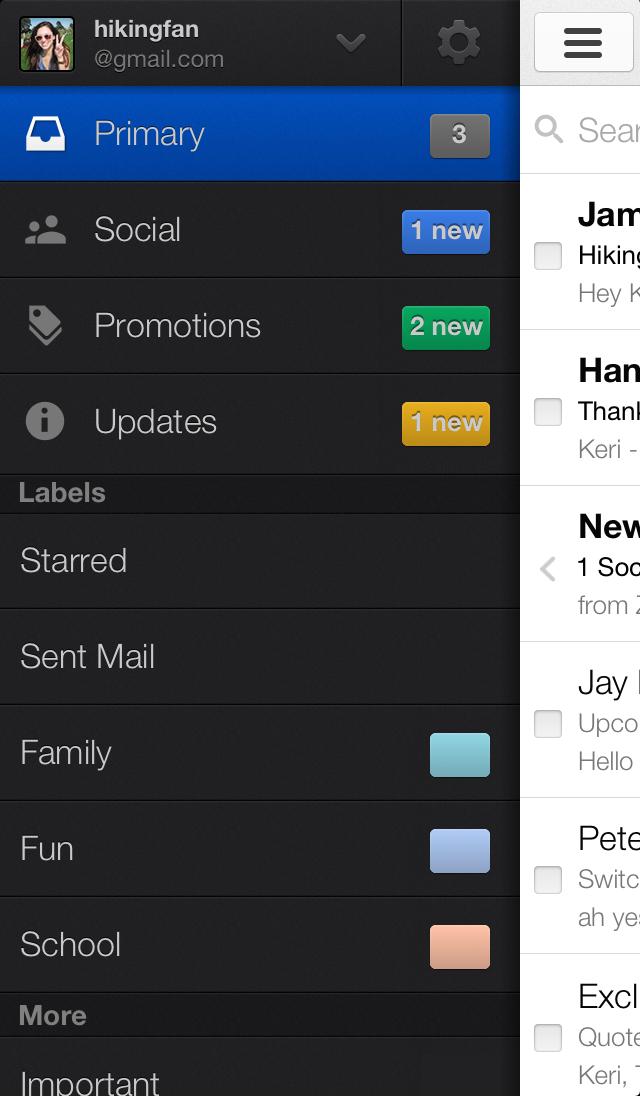
A new inbox that puts you back in control

We get a lot of different types of email: messages from friends, social notifications, deals and offers, confirmations and receipts, and more. All of these emails can compete for our attention and make it harder to focus on the things we need to get done. Sometimes it feels like our inboxes are controlling us, rather than the other way around. 

But it doesn’t have to be that way. Today, Gmail is getting a brand new inbox on desktop and mobile that puts you back in control using simple, easy organization.


On the desktop, the new inbox groups your mail into categories which appear as different tabs. You simply choose which categories you want and voilà! Your inbox is organized in a way that lets you see what’s new at a glance and decide which emails you want to read when.


You can easily customize the new inbox—select the tabs you want from all five to none, drag-and-drop to move messages between tabs, set certain senders to always appear in a particular tab and star messages so that they also appear in the Primary tab.

In the Gmail for Android 4.0+ and Gmail for iPhone and iPad apps, you'll see your Primary mail when you open the app and you can easily navigate to the other tabs.


If the new inbox isn't quite your style, you can simply switch off all optional tabs to go back to classic view, or switch to any of your other favorite inbox types

The new inbox is rolling out gradually. The desktop, Android and iOS versions will become available within the next few weeks. If you'd like to try out the new inbox on Desktop sooner, keep an eye on the gear menu and select Configure inbox when it appears in the Settings options.


By: Google Blog

Jun 22, 2013

Capturing the beauty and wonder of the Galapagos on Google Maps

The Galapagos Islands are some of the most biologically unique ecosystems in the world. Explorers and scientists alike have long studied and marveled at these islands—made famous by Charles Darwin. The Ecuadorean Government, local conservation groups and scientists are working to protect the Galapagos from threats posed by invasive species, climate change and other human impacts. 

It’s critical that we share images with the world of this place in order to continue to study and preserve the islands’ unique biodiversity. Today we’re honored to announce, in partnership with Charles Darwin Foundation (CDF) and the Galapagos National Parks Directorate (GNPD), that we’ve collected panoramic imagery of the islands with the Street View Trekker. These stunning images will be available on Google Maps later this year so people around the world can experience this remote archipelago. 


Daniel Orellana of Charles Darwin Foundation crossing a field of ferns to reach Minas de Azufre (naturally-occurring sulfur mines) on the top of Sierra Negra, an active volcano on Isabela Island. The Google Maps team traveled for more than three hours, hiking and on horseback, to reach this remote location.

Images, like the one you see above, are also an important visual record that the CDF and GNPD will use to study and protect the islands by showing the world how these delicate environments have changed over time.

Daniel Orellana of the Charles Darwin Foundation climbs out of a lava tunnel where he was collecting imagery. The dramatic lava landscapes found on Isabela island tell the story of the formation of the Galapagos Islands.

Our 10-day adventure in the Galapagos was full of hiking, boating and diving around the islands (in hot and humid conditions) to capture 360-degree images of the unique wildlife and geological features of the islands with the Trekker. We captured imagery from 10 locations that were hand-selected by CDF and GNPD. We walked past giant tortoises and blue-footed boobies, navigated through steep trails and lava fields, and picked our way down the crater of an active volcano called Sierra Negra.


A Galapagos giant tortoise crawls along the path near Googler Karin Tuxen-Bettman while she collects imagery with the Street View Trekker in Galapaguera, a tortoise breeding center, which is managed by the Galapagos National Park Service.

Life underwater in the Galapagos is just as diverse as life on land. We knew our map of the islands wouldn’t be comprehensive without exploring the ocean that surrounds them. So for the second time we teamed up with the folks at the Catlin Seaview Survey to collect underwater panoramic imagery of areas being studied by CDF and GNPD. This imagery will be used by Catlin Seaview Survey to create a visual and scientific baseline record of the marine environment surrounding the islands, allowing for any future changes to be measured and evaluated by scientists around the world. 

Christophe Bailhache navigates the SVII camera through a large group of Sea Lions at Champion Island in Galapagos. Image courtesy of the Catlin Seaview Survey.

We truly believe that in order to protect these Galapagos Islands, we must understand them. As they say, “a picture is worth a thousand words.” We hope this Street View imagery not only advances the important scientific research, but also inspires you to learn more about this special place. Stay tuned for updates on this collection—the first time we’ve captured imagery from both land and sea! We can’t wait to share this amazing imagery with you later this year.

By: Google Blog

Jun 21, 2013

5 tech trends that will change gaming forever

This year's E3 showed off a myriad of new technology intended to enhance our gaming experiences. The impending release of two powerful next generation gaming consoles this holiday season means games are going to become more advanced.
These advancements will not only improve the quality of the games' looks onscreen, but also allow them to interact with the players unlike ever before. From motion controls to second-screen gaming, E3 offered a glimpse of the bright, innovative future to come in gaming.
Of all the technology on display, we've highlighted the five trends we expect to change gaming in the next few years or so. See something we missed? Share your thoughts in the comments below.

1. Motion Controls Get Smarter

While Nintendo's Wii pioneered motion controls for gaming and Microsoft's Kinect brought a whole body sensor to the Xbox 360, the current offerings on the market are far from perfect. Motion controls are often gimmicky or added in unnecessarily. Additionally, Kinect's camera often requires exaggerated movements to follow the player's action.
Microsoft's new Kinect for the Xbox One is much more precise than the demos shown at E3. Microsoft's tech demo showed how it could detect more precise movements. In order to raise your shields and deflect bullets during a first-person shooter style match, you would simply tilt the controller upward. To activate your night vision goggles, you would tap the side of your head, and simply tilt your body left or right to literally lean around corners.
"We tried to make the motions more natural to what a gamer would do," Yusef Mehdi, Microsoft's corporate vice president of marketing and strategy for Interactive Entertainment Business branch, told Mashable.
This may include any natural moves by intense gamers. For example, in a racing game, a player might lean his body into the turns, which this upgraded Kinect would detect.
Harmonix, a company adept at working with the Kinect for its Dance Central games, showed how motion controls could operate in a more abstract way during the demonstration of its upcoming title Fantasia: Music Evolved. In the game, players conduct music with motions, enhancing the world around them. It's a unique game, and we haven't seen a control scheme quite like it before.

2. The Evolved Second Screen

At this year's E3, we saw more of second-screen integration from not only console makers, but also from game publishers.
Microsoft revealed much more information on the interaction between tablets running SmartGlass and Xbox One games. In Roman action-adventure game Ryse, for example, players can use tablets to watch friends' concurrent progress through different levels, along with videos of their conquests. In Xbox One's Project Spark, a game-creation game, players can use tablets in concert with the controller to create your game world.
Publisher Ubisoft had two titles with their own apps designed for tablets, both which added value for players. In Assassin's Creed IV: Black Flag, an Android and iOS app functions like a GPS device, allowing players to use it as a map in-game for their quests. When the game isn't running, the app allows players to send their fleet to quests while they aren't playing.
Tom Clancy's The Division is a multiplayer, third-person action game where players are charged with controlling a pandemic crisis in a stricken New York. The drop-in/drop-out co-op allows for players to quickly join each other's games, but also allows for a player to join via tablet. That tablet player operates a drone in the game, which can aid its team by marking enemies for take down, healing allies and getting a good survey of the area. 
It's impressive because the player on the tablet is actually taking part in a real-time game session. Of course, the Wii U tried to bring this idea to fruition last year, with its GamePad controller with a touch screen. While third-party games have taken full advantage of that screen's ability to convey extra information to the player, it hasn't been that widely adopted. Some of Nintendo's new first-party titles use the feature quite a bit, such as The Legend of Zelda: Wind WakerWii U remake, which uses the GamePad screen to swap items rather than pausing the game to get into a menu.

3. Virtual Reality

The Oculus Rift has only been in developers hands for a few months, but already the virtual reality headset is showing promise in the creative things programmers dream up for it. Virtual reality has often felt like a gaming pipe dream that is hallmarked by goofy accessory and poorly functioning technology, but that is about to change.
Oculus Rift creator Palmer Lucky said his company has come a long way since last year's E3, where the headset was only being shown off by former id Software cofounder John Romero. With 10,000 developer kits in the wild, and more shipping, creators of all backgrounds have been working on virtual reality games, and Oculus Rift now works with some of the most commonly used engines, like Unreal 4 and Unity.
There were about five or six playable Oculus Rift games at E3. The biggest of note was EVR, created by CCP Games, the makers of EVE Online. This space fighting game was only a tech demo, according to CCP developers, but it still demonstrated the awesome, immersive power of virtual reality.
Other indie titles featuring the Oculus Rift were playable at the IndieCade booth, and each provided a different take on what virtual reality could offer players. Soundself, created by Robin Arnott, was a game about meditative chanting, where the player's tonal hums made the dizzying spirals in front of their eyes spin and pulse along with the sounds they made.
Oculus Rift is only going up. The company announced Monday it received $16 million in venture funding to continue hardware development, and OculusVR was already showing off its new HD Rift at E3, which is a first for the platform.

4. Game DVR and Streaming

It's hard to ignore the growing trend of gaming as a spectator sport, with the rise of Major League Gaming and Twitch as places fans can go to watch live streams of gaming.
Both Sony and Microsoft have recognized gamers want to share their content, so they have integrated methods in both the PlayStation 4 and Xbox One to make what once was a complicated process very easy. Both consoles include the ability to broadcast your gameplay live with minimal work; the Xbox One will stream to Twitch, while the PS4 will send live video to Ustream. Both consoles also capture gameplay continuously via game DVR, and both allow players to edit key moments and share them with their friends.

5. Cloud Computing

In order to extend the life of gaming consoles and get more out of the hardware in your living room, console makers have turned to cloud computing. Instead of the console being the entire workhorse for processing, some will be handled by remote servers.
This isn't a new idea to gaming. The now-defunct OnLive started a few years ago on the premise that players could harness server power to play a wide variety of games that their home computers didn't necessarily have downloaded, and it wasn't the only company working on that idea. In 2010, streaming company GaiKai was purchased by Sony, and its technology is now helping power the PlayStation 4's cloud services.
Sony went into more detail in its February press conference on streaming, saying that it would be used to eventually bring older PlayStation games to the next-generation console, which isn't backwards compatible due to its radical architecture change from previous generations. It would also be used to allow PlayStation 4 games to stream to the handheld PlayStation Vita.
For the Xbox One, Microsoft software engineers showed a demo in which it had harnessed the console's internal processor to render 40,000 of the asteroids in the asteroid belt between Mars and Jupiter, displaying their movement in real time. Then, they showed that with help from Microsoft's 300,000 servers, the Xbox One could render 330,000 asteroids in that same belt. The engineer explained that this technology could make games look better, increase the map size and decrease load times.
By: Marshable